Start verification
Choose the workflow that matches the size of your list.
Protect every campaign before it sends
Remove invalid addresses, reduce bounces, and keep risky contacts away from your sender reputation.
{{ homeSummary }}
Choose the workflow that matches the size of your list.
Remove invalid addresses, reduce bounces, and keep risky contacts away from your sender reputation.

Effortlessly import email addresses from a CSV or tab-delimited TXT file.
Easily copy and paste email addresses from a spreadsheet or a similar source.
Upload a list or paste emails to remove invalid addresses, reduce bounces, and protect your sender reputation before sending.
Use a file for full list verification, or paste up to 200 emails for a quick upload.
Drag a list into this area, or browse from your computer.
Best for spot checks and small uploads up to 200 emails.
{{ pageSubtitle }}
Upload a CSV with email addresses, and we'll tell you which ones are clean, dirty, or unknown. No setup, no auto-charges.
Up to 5M rows. We auto-detect the email column.
Clean, dirty, or unknown โ based on real-time SMTP checks.
CSV, with status appended. Original order preserved.
{{ filteredEmptySubtitle }}
All {{ formatNumber(totalListsCount) }} of your lists processed successfully. If something fails in the future, you'll find it here.
{{ statusSummaryText() }}
Loading list details...
{{ data.analytics.summary.clean.perc }}% verified deliverable emails
{{ listHealthDescription() }}
| Reason | Count | Percent |
|---|---|---|
| {{ item.clean_type }} | {{ item.count }} | {{ item.perc }}% |
| Reason | Count | Percent |
|---|---|---|
| {{ item.dirty_type }} | {{ item.count }} | {{ item.perc }}% |
| List ID | {{ id }} | |
| Filename | {{ data.filename }} | |
| Amount |
|
{{data.cost.cost.USD }} |
| Currency | ||
| Plan Name | {{ data.plan_label }} | |
| Credits | {{ Number(data.credits).toLocaleString() }} | |
| Amount |
Save {{ Number(offer_code_data.discount_usd).toLocaleString() }} [{{offer_code_data.discount_perc}}% off] |
{{data.price_usd }} |
| Currency |
Offer Code |
|
Payment Methods |
{{ billingDetails.company_name }}
{{ invoiceFullName }}
{{ billingDetails.billing_email }}
{{ billingDetails.address }}
{{ [billingDetails.state, billingDetails.country].filter(Boolean).join(', ') }}
GST: {{ billingDetails.gstin }}
Add invoice details
Your payment is verified. Credits and invoice details are now available in your account.
{{ message || 'We could not verify this payment. Please retry or contact support if money was deducted.' }}
1. First Name
2. Last Name
3: Company Name (if applicable)
4: Your Payoneer Email
5: Country
6: Plan Name
7: Plan Amount
8: Listclean Signup Email
Once we receive the details, we will proceed to create the payment request on Payoneer.
Note: It may take 12 hours to complete the process.
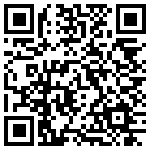
1. Open your Bitcoin wallet app or Scan the QR code.
2: Send minimum $50 to bc1qvq7l3pswsxytzhrn0fr4pdd7xft8fnkavyaqvt
3: Once you are done. Send transaction id to [email protected]
Note: It may take 12 hours to update the credits after payment.
1. Open your Tether wallet app or Scan the QR code.
2: Send minimum $50 to 0x8D5Df53e9316f06ac22b9Cd459aaeEC82e09A198
3: Once you are done. Send transaction id to [email protected]
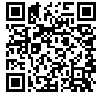
1. Open your Tether wallet app or Scan the QR code.
2: Send minimum $50 to TTA8JiDEYNY4Bc7mkn61wjWK4qNDjUo211
3: Once you are done. Send transaction id to [email protected]
Note: It may take 12 hours to update the credits after payment.
1. Send the money to the banking details below.
2: Send minimum $500
3: Once you are done. Send transaction id to [email protected]
| Swift Code | KKBKINBB |
|---|---|
| IBAN (Account Number) | 2814001570 |
| Account Holder | Symbolist Technology Private Limited |
| Bank Name | Kotak Mahindra Bank |
| Bank Address | MANISHA PRIDE, J N ROAD, OPP. KOTHARI SWEETS, MULUND (WEST), MUMBAI, PIN-400080, MAHARASTRA, INDIA |
| City | MUMBAI |
Note: It may take 12 hours to update the credits after payment.
Choose a one-time credit pack. Credits never expire, and clean or dirty verification results use 1 credit.
Higher-volume packs reduce your per-credit cost.
Check one address instantly before you add it to a campaign or CRM.
Validate mailbox, domain, and risk signals before using a contact.
Need to check more than one contact? Use
Each check combines address quality, domain readiness, and risk signals before returning a clean, dirty, or unknown outcome.
{{ group.desc }}
Monitor recent email verification activity, result mix, and API outcomes. Bulk uploaded list logs are available from list history.
Choose a range to refresh the summary, chart, and latest email verification logs.
Daily result distribution for the selected date range.
No chart data found for this date range.
Showing email verification logs for the selected date range.
No email verification logs found.
| Entered | Status | Remarks | |
|---|---|---|---|
| {{ item.entered || '-' }} | {{ item.email || '-' }} | {{ statusLabel(item.status) }} | {{ item.remarks || '-' }} |
Manage your credit balance, billing details, payments, and account activity in one place.
Credits are available immediately and are charged only for clean or dirty verification results.
Recent completed payment records.
No payment records found.
| Date | Method | Amount | Transaction |
|---|---|---|---|
| {{ item.date || '-' }} | {{ item.method || '-' }} | {{ formatPaymentAmount(item) }} | {{ item.transaction_id || '-' }} |
Recent credit ledger movement.
No credit activity found.
| Date | Credits | Remarks |
|---|---|---|
| {{ item.entered || '-' }} | {{ formatSignedCredits(item.credits) }} | {{ item.remarks || '-' }} |
Review credit additions, deductions, and verification usage activity for your account.
{{ data ? 'Credit ledger entries in your account.' : 'Fetching the latest credit activity.' }}
Latest credit movement is listed first.
Credit additions and usage deductions will appear here once your account has activity.
| Entered | Credits | Remarks |
|---|---|---|
|
{{ item.entered || '-' }}
Credit ledger
|
{{ formatSignedCredits(item.credits) }} | {{ item.remarks || '-' }} |
Share your Listclean experience on trusted software review platforms and earn credits plus a discount on future purchases.
Earn 2,000 credits for each approved review. Complete every listed review opportunity to claim up to {{ formatNumber(totalCredits) }} free credits and 25% off all plans.
Every approved review below earns {{ formatNumber(rewardPerReview) }} credits.
Send the review proof after publishing or submitting the review.
Rotate your account password with clear requirements and confirmation before the change is applied.
Enter your current password, then choose a new password that meets the account security requirements.
Your account password has been updated. Use the new password the next time you sign in.
Verify a new email address before it becomes the primary login credential for this account.
We will send a one-time verification code to this address. Your current login email remains active until the code is verified.
Enter the verification code sent to {{ email }}. Check spam or promotions if it does not arrive within a minute.
Your account login email has been updated to {{ email }}. Use this email the next time you sign in.
Review completed payments, amounts, currencies, and transaction references.
{{ data ? 'Completed payment records in your account.' : 'Fetching the latest payment records.' }}
Latest payment records are listed first.
Payments will appear here after credits are purchased successfully.
| Payment | Date | Method | Amount | Billing Email | Transaction |
|---|---|---|---|---|---|
|
#{{ item.id }}
Payment record
|
{{ item.date || '-' }} | {{ item.method || '-' }} | {{ formatPaymentAmount(item) }} | {{ item.billing_details_billing_email || '-' }} | {{ item.transaction_id || '-' }} |
Add invoice details
Invoice is generated using these details.
{{ fullName }}
{{ data.address }}
{{ [data.state, data.country].filter(Boolean).join(', ') }}
{{ data.billing_email }}
{{ data.company_name }}
GST: {{ data.gstin }}
Invoice is generated using these details.
Use your API token to verify emails directly from your app.
Verify one email with your API token, then move the same pattern into your production workflow.
{{ part.text }}
| #{{ item.id }} |
subject: {{item.subject}} From name: {{item.from_name}} |
{{item.status}} {{item.status}} {{item.status}} {{item.status}} |
{{ item.analytics.open_perc }} % ( Opens |
{{ item.analytics.click_perc }} % ( Clicks |
Loading..
Loading..
I will use HTML editor directly to create my campaign emailer
I want to use my previouly created HTML temlates for creating my campaign
I have HTML emailer available as web page, I want to fetch its content to create my campaign
| Device Type: | | |
|
|
|
Loading..
Loading..
Loading..
Choose your contact list(s)
Loading lists..
Loading..
| ID | Name | Contacts count | Action |
|---|---|---|---|
No lists found! Please add contact lists from above. |
|||
| {{ item.id }} | {{ item.name }} | {{ item.contacts_confirmed_count }} | |
Loading..
| Campaign ID: | {{ data.id }} |
| Subject: | {{ data.subject }} |
| Status: | {{ data.status }} |
| View History | |
|---|---|
| {{ item.email }} |
|
| Datetime | |
|---|---|
| {{ item.email }} | {{ item.datetime }} |
| col 1 | col 2 | col 3 |
|---|---|---|
| {{ item.col1 }} | {{ item.col2 }} | {{ item.col3 }} |
| Template ID | Name | Preview | Actions |
|---|---|---|---|
| {{ item.id }} | {{ item.name }} |
|
|
| Template ID | {{data.id}} |
| Template Name | {{data.name}} |
| Device Type | | |
|
|
|
|
|
|
Please choose how to add HTML to your Email Template.
I already have a HTML file to upload (if zip then first unzip and upload HTML, no worry you can add images further steps)
I have copied HTML source code of my template
I will create my own template by using an HTML editor
| Image | No. of times Used |
Upload | |
|---|---|---|---|
| {{index + 1}} | {{key}} | {{item}} |
Follow a short workflow to upload data, monitor verification, review results, and download clean contacts with confidence.
Use the guided flow below for your first upload, or jump directly into single email verification, API access, or integrations when your workflow is already defined.
The normal path from raw list to export-ready verification results.
{{ step.description }}
A short walkthrough of the upload, processing, and download path.
Documentation and help channels for setup, API work, and account questions.
Create below DNS records on your Domain / Nameserver providers.
| Type | Host | Value | Status |
|---|---|---|---|
| Loading.. |
| Domain | Status | Action |
|---|---|---|
| {{ item.domain }} | {{ call_s(item.status) }} {{ call_s(item.status) }} {{ call_s(item.status) }} |
|
You can send email through Mail250 by using a varity of SMTP enabled programming languages and software.
To send email using SMTP, you will need to know the following details:
Note: Your SMTP username and password are not the same as your Mail250 login username and password. Do not attempt to use your Mail250 login credentials to authenticate yourself against the SMTP endpoint.
Create secure API tokens for automated email verification and review active keys in one place.
Use a clear label so every token is easy to identify later.
{{ newToken }}
Store it securely before leaving this page. You will not be able to view it again.
Manage tokens currently allowed to access the Listclean API.
Create your first token to start verifying emails through the API.
| Label | Created | Action |
|---|---|---|
|
{{ item.label || 'Untitled token' }}
ID {{ item.id }}
|
{{ item.entered }} |
Select which events you would like reported back to your system.
A Webhook is a way to deliver events like open, click, bounce, etc. over the HTTP Protocol which helps to integrate with various applications.
No Webhooks Found
| Description | URL | Entered Date | Events | Status | Action |
|---|---|---|---|---|---|
| {{ item.desc }} | {{ item.url }} | {{ item.entered }} | {{ item.events.join(', ') }} | {{ call_s("Active") }} {{ call_s("Inactive") }} |
|
You can control the tracking of your outgoing emails.
| Setting | Status | Action |
|---|---|---|
{{ custom_lang(item.name) }} |
Enabled Disabled |
Manage login access, security, and billing identity for this Listclean account.
{{ billingCountry }}
Copy stable identifiers for support, team communication, and integrations.
Manage login access and programmatic access for this account.
Billing details are used for receipts, tax information, invoice accuracy, and support verification when account ownership needs to be confirmed.
Review current spend, plan details, billing information, and invoices.
{{data.free_credits_used}} credits used out of {{data.free_credits_total}}
{{data.paid_credits_used}} credits (after deducting free credits) charged at ${{data.price_per_1k_usd}}/1000 emails: ${{ data.paid_credits_charge }}
{{data.plan_label}} (${{data.plan_subscription_charge}}/month) for {{data.plan_subscription_prorata_days}} days (on pro-rata basis) is: ${{ data.plan_subscription_prorata_charge }}
Past dues amount is: ${{ data.usd_due_amount }}
Total Amount [ ${{ data.paid_credits_charge }} + ${{ data.plan_subscription_prorata_charge }} + ${{ data.usd_due_amount }} ] is: ${{ data.usd_you_owe }}
Email sends: {{data.credits}}
Sending IP type: {{data.sending_ip_type}}
Sending speed: {{data.speed}} emails/ hour
Plan start date: {{data.PLAN_START_DATE}}
Plan end date: {{data.PLAN_END_DATE}}
{{data.credits_used}} of {{data.credits}}
{{data.BALANCE}} sends remaining until your plan requires an upgrade.
0 sends remaining! Please upgrade your account.
You pay $0 each month
You pay $10 each month
Top 10 Domains with more than 5 emails.
No Top Domains Found
| Domain | Total | Percentage |
|---|---|---|
| {{ custom_lang(item.domains) }} | {{ custom_lang(item.num) }} | {{ custom_lang(item.perc) }}% |
Top 10 Recipient Usernames with more than 5 emails.
No Top Recipient Usernames Found
| Username | Total | Percentage |
|---|---|---|
| {{ custom_lang(item.recipient_username) }} | {{ custom_lang(item.num) }} | {{ custom_lang(item.perc) }}% |
| ID | Name | Total Contacts | Actions |
|---|---|---|---|
| {{ item.id }} |
|
|
|
| List ID | {{ data.id }} |
| List Description | {{ data.description }} |
| Created at | {{ data.entered }} |
| Total contacts | {{ data.contacts_total_count }} |
| Confirmed contacts | {{ data.contacts_confirmed_count }} |
| Unsubscribed contacts | {{ data.contacts_unsubscribed_count }} |
I already have clean data. Upload Original CSV file.
I want to quickly copy-paste email addresses into my contact list
I have data in a CSV file.
The email addresses one per line, in the below box
| Actions | |
|---|---|
|
|
| Id | Name | Default Value | Action |
|---|---|---|---|
| {{ item.id }} | {{ item.name }} | {{ item.default_value }} |
|
| Domain | Action |
|---|---|
| {{ item }} |
The domains one per line, in the below box
| Contacts | Added | Reason | Action |
|---|---|---|---|
| {{ item.email }} | {{ item.added }} | {{ item.data }} |
The contacts one per line, in the below box
No records found!!
| List Upload ID | Entered | Filename | Status Description | Progress | Status | Details |
|---|---|---|---|---|---|---|
| {{ item.list_upload_id }} | {{ item.entered }} | {{ item.filename }} | {{ item.status_description }} | {{ item.progress }}% | {{ item.status }} |
|
| List Uploadd ID | {{ data.list_upload_id }} | ||
| Entered | {{ data.entered }} | ||
| Filename | {{ data.filename }} | ||
| Status Description | {{ data.status_description }} | ||
| Progress | {{ data.progress }}% | ||
| Status | {{ data.status }} | ||
| List Upload Details | |||
|
|||
| Contact ID | {{ data.id }} |
| {{ data.email }} |
| Name | Value |
|---|---|
| {{ item.name }} | {{ item.value }} |
| No Subscription History found |
| Date | Details | Summary | IP | System Info |
|---|---|---|---|---|
| {{ item.date }} | {{ item.detail }} | {{ item.summary }} | {{ item.ip }} | {{ item.systeminfo }} |
| No Campaign History found |
| Campaign ID | Sent at | Viewed at | Response time | ||
|---|---|---|---|---|---|
| {{ item.campaign_id }} | {{ item.sent_at }} | {{ item.viewed_at }} | Not viewed | {{ item.response_time }} | Not responded |
| Contact ID | {{ data.id }} |
| {{ data.email }} |
| Name | Value |
|---|---|
|
|
| col 1 | col 2 | col 3 |
|---|---|---|
| {{ item.col1 }} | {{ item.col2 }} | {{ item.col3 }} |
Filter and review email event logs.
| Datetime | Message ID | Event | Summary |
|---|
Automate email verification through Zapier, API keys, SMTP credentials, and webhooks without changing your existing workflow.
Use no-code templates for common apps, API access for product integrations, and webhooks for event-driven systems.
Search, preview, and launch Zapier automations that use Listclean.
Start from the most common email verification automations.
Share Listclean with customers, partners, and communities, then track signups, commissions, payout setup, and payout history in one place.
Earn commission when referred accounts make new payments. Your affiliate dashboard becomes available after joining the program.
Join once to activate your unique referral code and start tracking referred customers from your dashboard.
Share this URL anywhere you recommend Listclean.
{{ affiliateUrl }}
Accounts created through your affiliate link.
No referred signups yet.
| Signup date | Username |
|---|---|
| {{ item.signup_date || '-' }} | {{ item.referred_instance_name || '-' }} |
Commission earned from referred account payments.
No commission records yet.
| Payment date | Username | Currency | Payment amount | Commission amount |
|---|---|---|---|---|
| {{ item.payment_date || '-' }} | {{ item.referred_instance_name || '-' }} | {{ item.currency || '-' }} | {{ item.payment_amount || '-' }} | {{ item.commission_amount || '-' }} |
Payouts already sent to your saved payment method.
No payouts have been sent yet.
| Payment date | Currency | Amount | Method | Remarks |
|---|---|---|---|---|
| {{ item.payment_date || '-' }} | {{ item.currency || '-' }} | {{ item.payment_amount || '-' }} | {{ item.payment_method || '-' }} | {{ item.remarks || '-' }} |
Find B2B emails from public sources, refine with filters, and export verified leads.
Search public business profiles by country, title, and industry. Export only the contacts you need.
Found emails are sourced from public data or generated with names, then verified.
No matching prospects found. Try a broader country, role, or industry filter.
Track generated prospect exports, monitor credit usage, and download completed files.
Completed orders can be downloaded immediately. Processing orders update after refresh.
Find prospects, select contacts, and create an export order. Completed files will appear here.
| Download ID | Entered | Status | People count | Credits reserved | Credits used | Actions |
|---|---|---|---|---|---|---|
| #{{ order.id }} | {{ order.entered || '-' }} | {{ statusLabel(order.status) }} | {{ formatNumber(order.people_counts) }} | {{ formatNumber(order.credits_reserved) }} | {{ formatNumber(order.credits_used) }} | Download Processing |
Enter first name, last name, and domain to instantly generate a single email address.
Copy and Paste multiple names and domains to quickly create multiple email addresses.
Upload a CSV file containing names and domains to generate emails in bulk.
Generate likely business email patterns from a name and domain, then verify the address before outreach.
Enter a contact name and company domain. Verification uses credits only when you choose to check an address.
Copy a candidate address or verify it before using it in outreach.
Enter a name and domain to generate likely business email patterns.
| # | Email address | Status | Action |
|---|---|---|---|
| {{ index + 1 }} | {{ email.address }} | Checking {{ statusLabel(email.status) }} |